Working with data
You can use uploaded datasets or simulation results to configure and calibrate models. If the data doesn't align with your intended analysis, you can transform it by:
- Creating new variables
- Calculating summary statistics
- Filtering data
- Joining datasets
The Transform data operator can also serve as a place to visually plot and compare multiple datasets or simulation results.
Note
For information about uploading datasets, see Gather modeling resources.
Dataset resource
A dataset resource can represent:
- A dataset you've uploaded.
- A dataset you've modified and saved.
- The output of a simulation or an optimized intervention policy.
In a workflow graph, a dataset resource lists the columns it contains. You can use it to:
- Open and explore the raw data.
- Run data transformations, model configurations, and model calibrations.
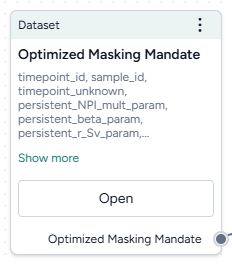
-
Inputs
- None
-
Outputs
- Dataset
Add a dataset resource to a workflow
- Drag the resource from the Datasets section of the Resources panel.
What can I do with a dataset resource?
Hover over the output of the Dataset resource and click link to use the dataset as an input to one of the following operators.
-
Data
- Transform dataset
Guide an AI assistant to modify or visualize the dataset. - Compare dataset
Compare the impacts of two or more interventions or rank interventions.
- Transform dataset
-
Configuration and intervention
- Configure model
Use the dataset to extract initial values and parameters for the condition you want to test. - Validate configuration
Use the dataset to validate a configuration.
- Configure model
-
Simulation
- Calibrate
Use the dataset to improve the performance of a model by updating the value of configuration parameters. - Calibrate ensemble
Fit a model composed of several other models to the dataset.
- Calibrate